If you’ve spent any time researching the best SEO tools for your business, you’ve probably experienced sticker shock. Enterprise platforms like Ahrefs, Moz, and full-featured SEMRush subscriptions can easily run $200-$500+ per month. Stack multiple tools together for comprehensive coverage—keyword research, technical audits, rank tracking, content optimization, analytics—and you’re looking at $1,000-$3,000 monthly before you know it.
But here’s the truth that most SEO agencies won’t tell you: you don’t need to spend thousands of dollars per month to build an effective low-cost SEO tools strategy. With smart tool selection and leveraging free alternatives, you can create a complete SEO workflow for under $100 monthly—or even less.
This guide breaks down nine powerful and cheap seo tools that deliver professional-grade capabilities without the enterprise price tag. Whether you need a website SEO checker, keyword research platform, or conversion tracking, this stack covers every essential SEO discipline for a fraction the typical cost.
The Complete Value SEO Tool Stack Under $100/Month

1. DataForSEO: API-Powered Data Aggregation
DataForSEO revolutionizes how agencies and advanced users access SEO data through its powerful API infrastructure. Unlike traditional seo tools with rigid dashboards, DataForSEO provides raw data you can integrate anywhere—from custom dashboards to automated reporting systems.
Key Use Cases
The platform shines in several scenarios. If you’re building custom SEO workflows, the Google Sheets connector eliminates coding requirements entirely. Connect your spreadsheet, pull keyword search volumes, SERP data, backlink profiles, and more—all updated automatically on your schedule.

For AI-powered SEO analysis, DataForSEO’s API integrates seamlessly with AI bots and agents. Imagine an AI assistant that automatically pulls competitor keyword gaps, analyzes SERP features, and recommends content opportunities—all powered by DataForSEO’s comprehensive database.
Pricing That Makes Sense
DataForSEO uses pay-as-you-go pricing starting at just $0.000125 per URL for on-page audits and $0.001 per keyword research request. Most users spend $5-15 monthly for light usage, making it the most affordable data source in this stack. New users get $1 free credit to test all features.
2. ChatLLM with DeepAgent: AI-Powered Content Creation

Content creation represents the most time-intensive aspect of SEO. ChatLLM with DeepAgent transforms this process by combining advanced language models with multimedia generation capabilities—all for just $10 monthly.
Editor Mode for Article Writing
Unlike ChatGPT’s conversational interface, ChatLLM’s editor mode provides a dedicated workspace for long-form content. Write SEO-optimized blog posts with AI assistance that understands context across thousands of words. The interface supports iterative editing, allowing you to refine sections while maintaining coherence throughout the article.
Image and Video Generation
Generate hero images with Flux and Ideogram models, create product visuals, and even produce short-form videos using Cling AI—all within the same platform. This eliminates expensive stock photo subscriptions and graphic design tools.
DeepAgent Performance Analysis
The real power emerges when connecting DeepAgent agents to Google Analytics and Search Console APIs through MCP servers or via an API key. Build custom agents that automatically analyze organic traffic trends, identify keyword ranking opportunities, and generate weekly performance reports without manual intervention. This automation alone saves 5-10 hours monthly in reporting time.
Cost Efficiency: At $10/month versus ChatGPT Teams at $20/month, ChatLLM offers 3x better value while providing superior multimedia capabilities and custom agent building.
For more information about ChatLLM check out our dedicated ChatLLM review.
3. Sitebulb: Technical SEO Auditing
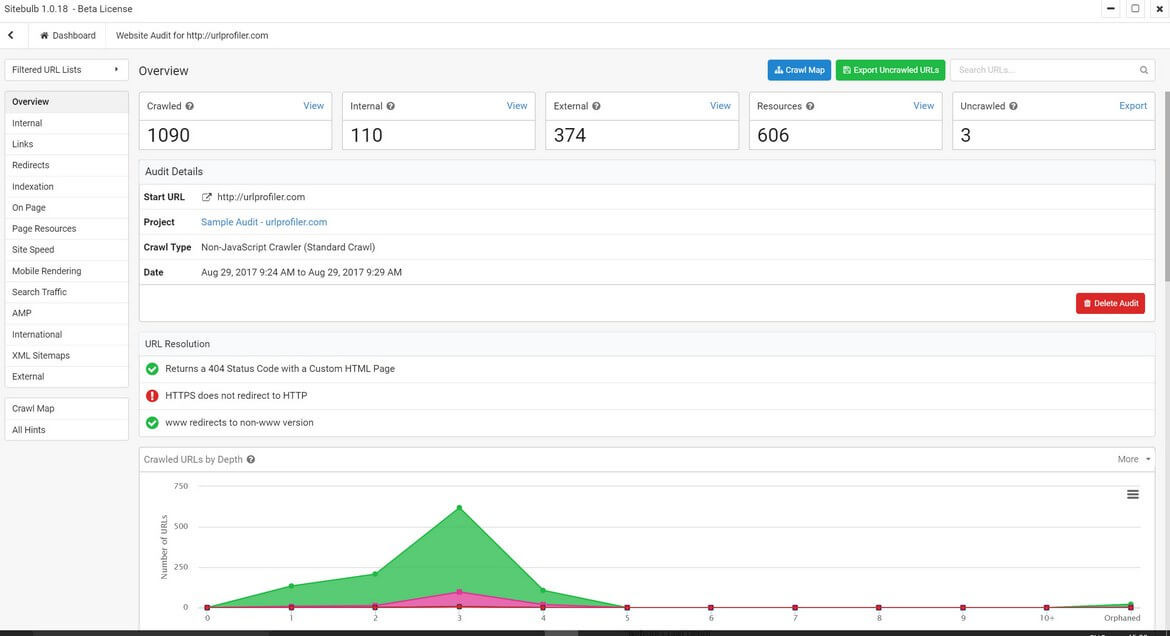
Technical SEO issues can silently destroy your rankings. Sitebulb provides enterprise-grade technical audits at a fraction of typical costs, making it one of the best seo tools for identifying crawlability problems, duplicate content, and site structure weaknesses.
Lite Tier Capabilities
For $15/18 month (annual/monthly), for Sitebulb Lite delivers comprehensive seo site audit functionality:
- 10,000 URL crawls – Sufficient for most small to medium websites
- 138 prioritized SEO hints – Clear guidance on which issues to fix first
- JavaScript rendering – Critical for modern React/Vue/Angular sites
- Visual crawl maps – Understand site architecture at a glance
- Duplicate content detection – Identify and consolidate thin pages
- PDF reports – Client-ready documentation for agencies
Unlike Screaming Frog’s overwhelming data dumps, Sitebulb presents findings through intuitive visualizations and prioritized recommendations. This makes it accessible for non-technical users while providing depth that experts appreciate.
4. Keysearch.co: Affordable Keyword Research

Keyword research separates successful content from shots in the dark. Keysearch.co’s Starter Plan delivers professional keyword tool capabilities at entry-level pricing, with promotional offers often dropping costs to $13.60-17/month.
Core Features in Lowest Tier
- 200 keyword lookups daily – More than enough for consistent research
- 80 keywords tracked monthly – Monitor rankings for your target terms
- Competitor gap analysis – Compare up to 3 competitors simultaneously
- AI Content Assistant – SERP-based optimization recommendations
- Backlink checker – Identify referring domains without Ahrefs costs
- YouTube keyword research – Optimize video content for discovery
- Site audits – Crawl up to 2,000 pages monthly
The platform excels at finding low-competition opportunities. Its difficulty scores help identify winnable keywords that larger semrush seo tools might overlook due to focusing on high-volume terms.
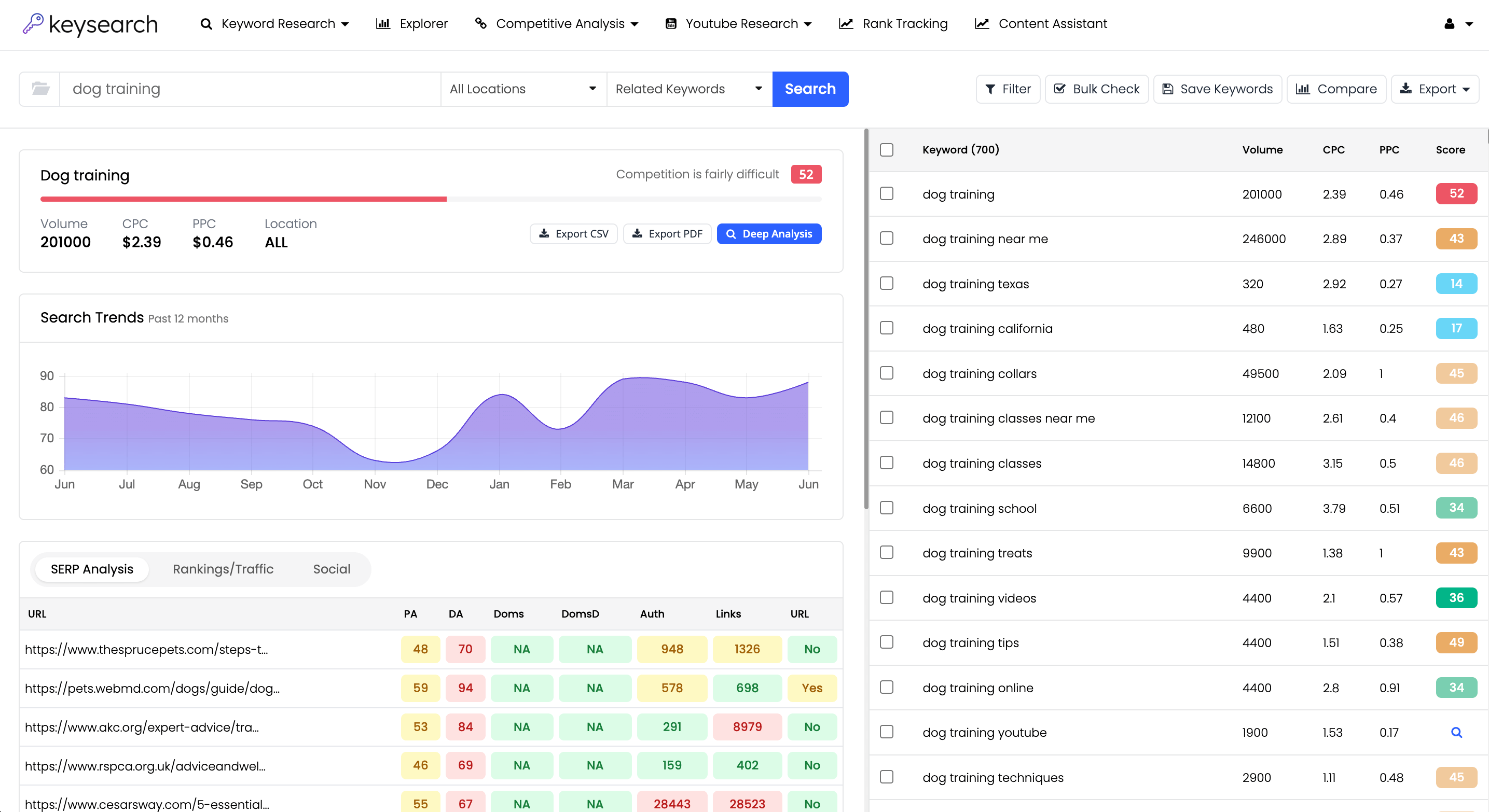
You could just use DataforSEO to get your keyword search volume data and identify your target keywords but Keysearch has a great interface and makes it easier to identify your target keywords and save them into target keyword groups.
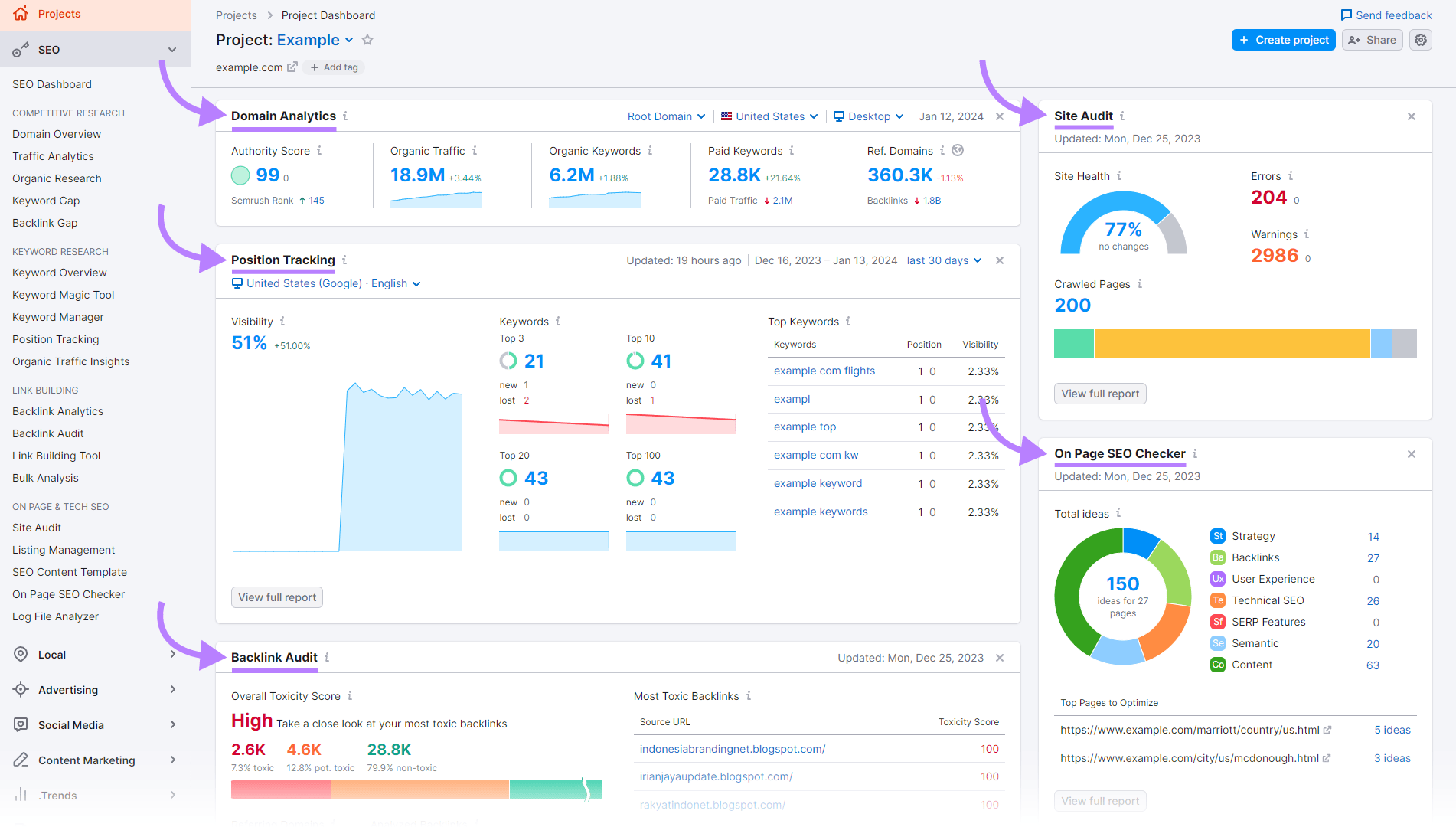
5. SEMRush Free Version: Competitor Intelligence

While semrush SEO tool subscriptions start at $139.95/month, the free version provides surprising utility for competitive analysis—if you understand its limitations.
What You Actually Get
SEMRush free tier offers 10 search credits daily. Each domain overview consumes 3 credits, effectively allowing 3 full competitor analyses per day. These reports reveal:
- Organic vs. paid traffic composition
- Top organic keywords driving traffic
- Competing domains based on keyword overlap
- Basic backlink profile with referring domains
- Search volume and difficulty for individual keywords
Strategic Use Cases
The free version works best for occasional reconnaissance. Before launching a new content initiative, analyze 2-3 main competitors to understand their keyword strategies. Use this intelligence to inform your Keysearch research and identify content gaps.
Reality check: The 10-credit daily limit, inability to export data, and shallow historical insights make free SEMRush insufficient as your primary research tool. Consider it bonus intelligence rather than a cornerstone of your stack.
6. Rank Math SEO: On-Page Optimization for WordPress
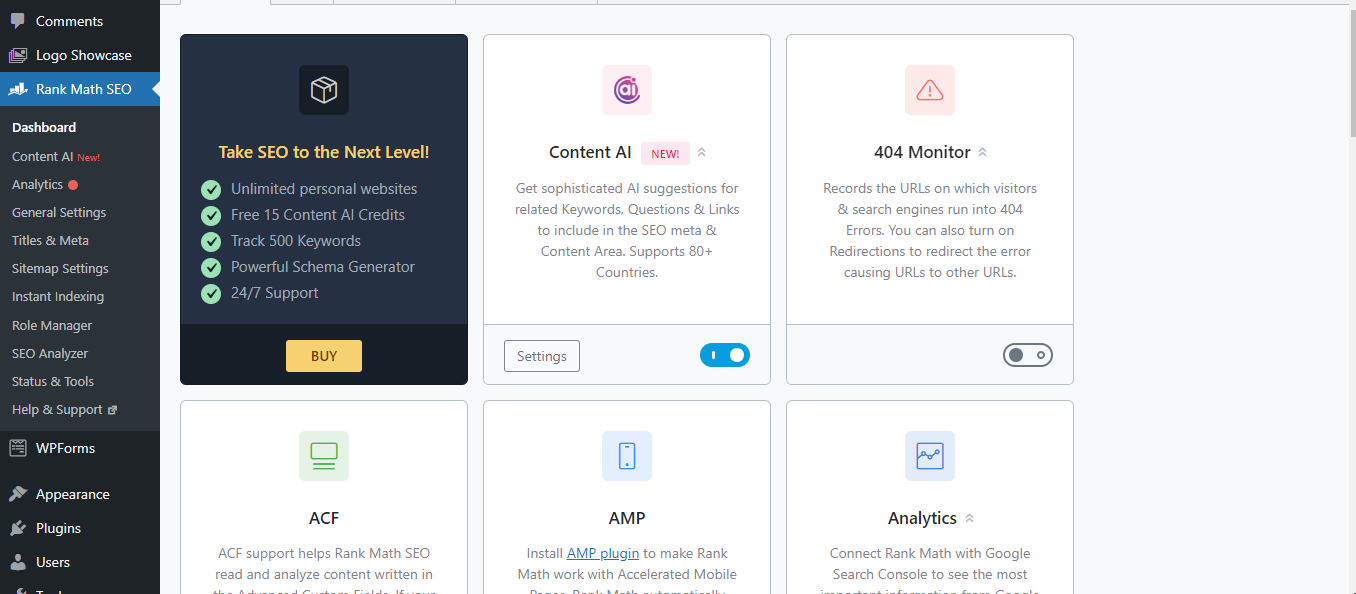
For WordPress users, Rank Math SEO represents the gold standard in on-page optimization plugins—and its core features are completely free.
Real-Time SEO Grading
As you write, Rank Math analyzes your content against 30+ ranking factors, providing instant feedback on:
- Keyword density and placement
- Heading structure (H1, H2, H3 optimization)
- Internal and external linking
- Meta title and description optimization
- Image alt text completeness
- Readability scores (Flesch reading ease)
- Schema markup implementation
Free SEO Analyzer Tool
Even if you don’t use WordPress, Rank Math’s free SEO analyzer provides comprehensive site audits for any website. Enter any URL to receive a detailed report covering technical SEO, on-page factors, and performance metrics—completely free, no signup required.
WordPress Plugin Features
The free plugin includes unlimited keyword optimization per post (expandable from default 5), LSI keyword suggestions, automatic XML sitemaps, 404 monitoring with redirect management, and direct Google Search Console integration. This eliminates need for multiple plugins, reducing potential conflicts and performance issues.
Pro tip: While premium plans ($7.99/month+) add Content AI and advanced schema, the free version covers 95% of what most sites need for effective on-page optimization.
7. Google Search Console: Free Organic Performance Tracking

No SEO stack is complete without Google’s own data. Google Search Console seo tool provides direct insights from Google’s search index—completely free with unlimited access.
Performance Report Deep Dive
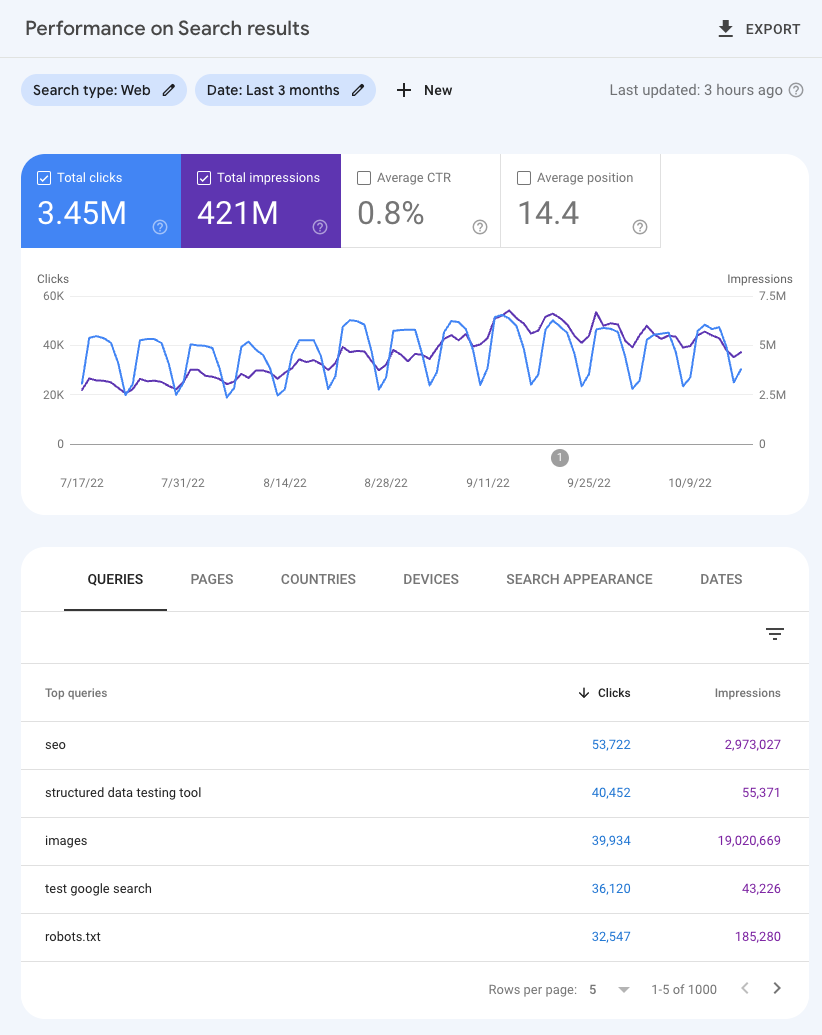
The Performance Report shows exactly how Google sees your site:
- Clicks: Actual traffic from Google search
- Impressions: How often your pages appear in results
- Average position: Your ranking for each query
- CTR: Click-through rate revealing meta description effectiveness
Filter by queries, pages, countries, devices, and date ranges to understand performance at granular levels. This data directly informs content optimization—identify high-impression, low-click pages that need better meta descriptions, or discover ranking opportunities where you’re on page 2 and need content refreshes.
It’s also worth integrating the free Google Sheets Add-on for Google Search Console as well, to enable you to export data quickly into Google Sheets and also create tables by two dimensions (e.g. queries by page or pages by location)
Technical Monitoring
Beyond performance, Search Console monitors technical health:
- URL Inspection: Check indexing status for individual pages
- Index Coverage: Identify crawl errors preventing indexing
- Core Web Vitals: Track user experience metrics affecting rankings
- Mobile Usability: Ensure responsive design compliance
- Manual Actions: Receive notifications of penalties
Integration with Google Analytics provides complete attribution from keyword to conversion.
8. Google Analytics: Free Conversion and Revenue Tracking
SEO without conversion tracking is guesswork. Google Analytics 4 (GA4) transforms organic search from a traffic metric into a revenue channel by connecting search visitors to actual business outcomes.
Traffic Acquisition and Attribution
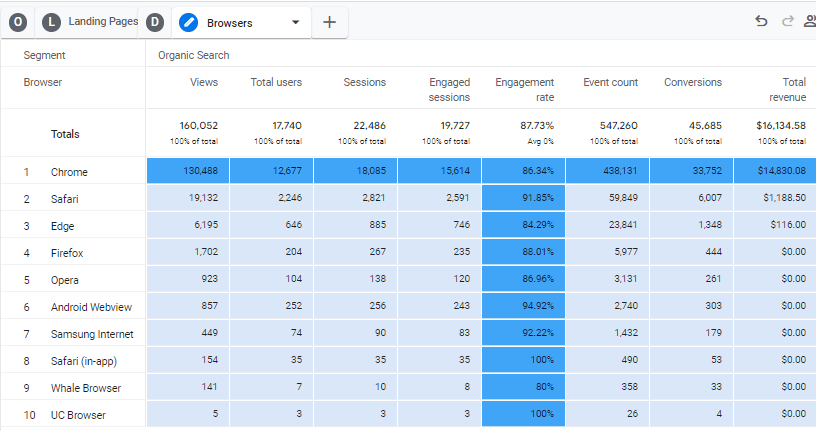
The Traffic Acquisition report segments all traffic by source, with organic search as a dedicated channel. Track sessions, engagement rate, key events (conversions), and revenue specifically from organic traffic. This answers the critical question: “Is our SEO investment generating ROI?”
Conversion Event Tracking
GA4’s event-based model tracks micro and macro conversions:
- Form submissions (contact, newsletter, demo requests)
- E-commerce purchases with transaction values
- Goal completions (PDF downloads, video views, account creation)
- Engagement metrics (scroll depth, time on page, pages per session)
Filter these events by organic search source to calculate conversion rates and identify top-performing landing pages. If your blog post about “SEO tools” drives 1,000 organic sessions monthly with a 5% conversion rate on your $99 product, that’s $4,950 in monthly revenue from a single piece of content.
Integration Power
Link GA4 with Search Console to connect keyword-level data with conversion outcomes. While Google doesn’t provide keyword-level attribution for all traffic (due to “not provided” limitations), the Search Console integration reveals which queries drive clicks, and GA4 shows what those visitors do next.
9. Hotjar: Free Session Recordings for Conversion Optimization

Driving organic traffic is half the battle. Converting that traffic requires understanding user behavior. Hotjar’s free tier provides essential tools for optimizing conversion rates through actual visitor session analysis.
Free Tier Capabilities
- 35 daily session recordings (or 20,000 monthly sessions)
- Unlimited heatmaps showing click, scroll, and movement patterns
- 3 feedback polls to ask visitors about conversion barriers
- Conversion funnel tracking identifying abandonment points
- Form analysis monitoring field interactions and drop-offs
Actionable Insights for SEO Traffic
Filter recordings to show only organic search visitors. Watch real users navigate from your SERP listing to your site. You’ll discover:
- Whether users find what they expected based on meta descriptions
- Where they get confused or frustrated (rage clicks)
- How far they scroll before bouncing
- Which CTAs they click versus ignore
- Form fields that cause abandonment
For example, if heatmaps reveal organic visitors consistently miss your primary CTA because it’s below the fold, move it higher. If session recordings show users immediately bouncing because your H1 doesn’t match their search intent, rewrite it. These insights transform generic conversion optimization into data-driven improvements specifically for search traffic.

Complete SEO Tool Stack Comparison
| Software Name | SEO Area | Key Capabilities | Price |
|---|---|---|---|
| DataForSEO | Data Aggregation & API | Google Sheets connector, keyword research API, SERP data, backlink analysis, AI bot integration | ~$20/month (depending on usage) |
| ChatLLM DeepAgent | Content Creation & AI | Article writing in editor mode, image generation, video generation, DeepAgent agentic AI analysis with Google Analytics/Search Console APIs | $10/month |
| Sitebulb Lite | Technical SEO Audits | 10,000 URL crawls, 138 prioritized hints, JavaScript rendering, duplicate content detection, visual crawl maps | $15/month |
| Keysearch.co Starter | Keyword Research | 200 daily lookups, 80 keyword tracking, competitor gap analysis, AI content assistant, backlink checker, site audits | $17/month |
| SEMRush Free | Competitor Analysis | 10 daily credits, domain analytics, organic keywords, backlink data, competitor identification (limited) | $0/month |
| Rank Math SEO | On-Page Optimization | 30+ factor grading, unlimited keywords, LSI suggestions, schema markup, free SEO analyzer tool, WordPress plugin | $0/month |
| Google Search Console | Organic Performance | Click/impression data, keyword rankings, URL inspection, index coverage, Core Web Vitals, mobile usability | $0/month |
| Google Analytics 4 | Conversion Tracking | Traffic acquisition, conversion events, revenue attribution, engagement metrics, audience segmentation | $0/month |
| Hotjar Free | Conversion Optimization | 35 daily session recordings, unlimited heatmaps, 3 feedback polls, funnel tracking, form analysis | $0/month |
| TOTAL MONTHLY COST: | $62/month | ||
Building Your Budget-Friendly SEO Strategy
This stack proves you don’t need enterprise budgets to compete in organic search. For just $62 a month, you can get comprehensive coverage across all critical SEO disciplines:
- Data & Research: DataForSEO + Keysearch.co + SEMRush free
- Technical SEO: Sitebulb + Google Search Console + Rank Math
- Content Creation: ChatLLM Deepseek
- Performance Tracking: Google Analytics + Google Search Console
- Conversion Optimization: Hotjar + Google Analytics
Each tool fills a specific role without overlap, maximizing value while minimizing spend. The four free tools (Google Search Console, Google Analytics, Rank Math, SEMRush free, Hotjar free) handle foundational needs, while the five paid tools ($62 combined) provide specialized capabilities that free alternatives can’t match.
Getting Started
Implement this stack incrementally:
- Week 1: Set up free tools (Google Search Console, Analytics, Rank Math, Hotjar)
- Week 2: Add DataForSEO with Google Sheets connector for initial keyword research
- Week 3: Subscribe to Keysearch.co and run first keyword gap analysis
- Week 4: Add ChatLLM for content creation and Sitebulb for technical audit
This phased approach prevents overwhelm while allowing you to validate ROI before committing to the full stack.
Conclusion: SEO Success Without Breaking the Bank
The best seo tools aren’t always the most expensive. By strategically combining purpose-built paid tools with powerful free platforms, you create a professional SEO workflow for under $100 monthly—a fraction of what typical agency stacks cost.
This setup works for solopreneurs, small businesses, small agencies managing multiple clients, and even mid-sized companies looking to reduce tool spending. The key is understanding what each tool does best and avoiding redundant features you’ll never use.
Start with the free foundation (Google Search Console, Analytics, Rank Math), then add paid tools based on your specific needs. Whether you’re focused on technical SEO, content creation, or conversion optimization, this stack scales with your requirements while keeping costs predictable and low.
Your SEO success isn’t determined by budget size—it’s determined by strategy, consistency, and using the right tools for your specific goals. This $62/month stack provides everything you need to compete with sites spending 10-20x more on tools.